How to Download & Install iOS 17.0.1 / iPadOS 17.0.1
Prior to starting the system software updates, be sure you backup iPhone/iPad to iCloud, Finder, or a windows PC. After that, installing the update will be familiar:
- Open “Settings” on iPhone or iPad
- Go to “General”
- Select “Software Update”
- Select to “Download and Install” for iOS 17.0.1 / iPadOS 17.0.1
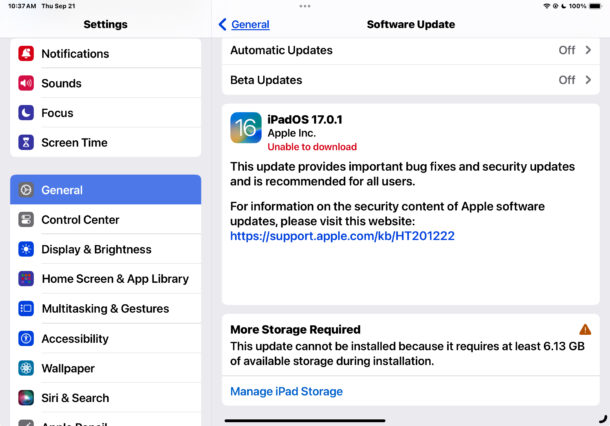
As usual, installing the update requires the iPhone or iPad to restart.
You can also update your iPhone or iPad using a computer and USB cable, where updates are available in Finder on a Mac, or iTunes on a PC. Advanced users can use IPSW files from Apple to update manually as well.
iOS 17.0.1 IPSW Download Links
- iPhone 14 Pro Max
- iPhone 14 Pro
- iPhone 14 Plus
- iPhone 14
- iPhone SE (3rd generation)
- iPhone 13
- iPhone 13 Pro
- iPhone 13 Pro Max
- iPhone 13 mini
- iPhone 12, iPhone 12 Pro
- iPhone 12 Pro Max
- iPhone 12 mini
- iPhone 11 Pro, iPhone 11 Pro Max
- iPhone 11
- iPhone XS, iPhone XS Max
- iPhone XR
- iPhone SE (2nd generation)
iPadOS 17.0.1 IPSW Download Links
- 11-in. iPad Pro (4th generation), 12.9-in. iPad Pro (6th generation)
- 10.2-in. iPad (10th generation)
- iPad Air (5th Generation)
- iPad mini (6th generation)
- 10.2-in. iPad (9th generation)
- 11-in. iPad Pro (3rd generation), 12.9-in. iPad Pro (5th generation)
- iPad Air (4th generation)
- 10.2-in. iPad (8th generation)
- 11-in. iPad Pro (1st and 2nd generations), 12.9-in. iPad Pro (3rd and 4th generations)
- 10.5-in. iPad Pro (1st generation), 12.9-in. iPad Pro (2nd generation)
- iPad (6th generation)
- iPad mini (5th generation), iPad Air (3rd generation)
- 10.2-in. iPad (7th generation)
iOS 17.0.1 / iPadOS 17.0.1 Release Notes
Release notes for iOS 17.0.1 and iPadOS 17.0.1 :
This update provides important bug fixes and security updates and is recommended for all users.
For information on the security content of Apple software updates, please visit this website:
https://support.apple.com/kb/HT201222
Some iPhone users are seeing an alternative set of release notes for iOS 17.0.1 that mention the (yet to be delivered) iPhone 15 series:
This update provides bug fixes and important security updates for iPhone 15 and iPhone 15 Pro
models.
Despite the release notes mentioning iPhone 15, the update is relevant to all other iPhone models as well.
Separately, Mac users and Apple Watch users will also find system software updates available to download and update onto their devices.