Separately, tvOS 17.5.1 is also available for Apple TV.
How to Download & Install iOS 17.5.1 / iPadOS 17.5.1 Update
As always, backup iPhone or iPad to iCloud or your computer before starting a software update.
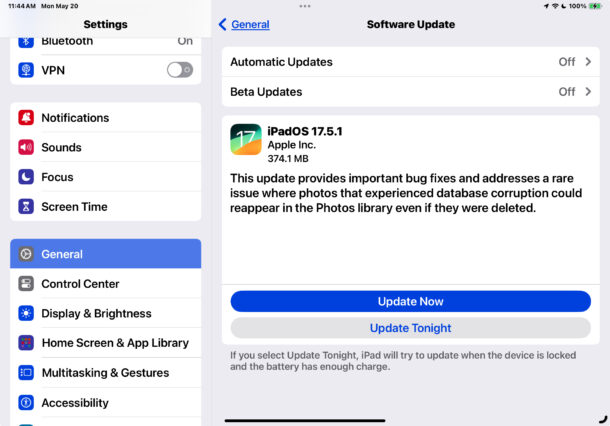
- Open the “Settings” app on iPhone or iPad
- Go to “General”
- Select “Software Update”
- Choose to “Update Now” to download and install iOS 17.5.1 / iPadOS 17.5.1 update
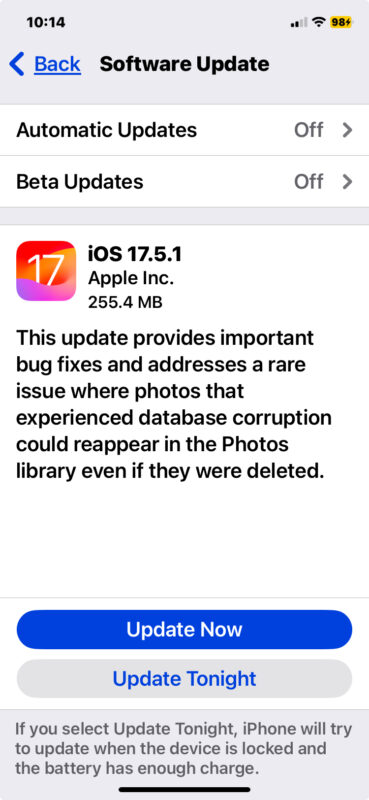
Restarting the device is necessary to complete installation of the update.
You can update your device using a computer and USB connection as well. For those wishing to update multiple devices or install updates manually, another option is to use IPSW firmware files.
iOS 17.5.1 IPSW Download Links
Direct download links for iOS 17.5.1 IPSW:
- iPhone 15 Pro Max
- iPhone 15 Pro
- iPhone 15 Plus
- iPhone 15
- iPhone 14 Pro Max
- iPhone 14 Pro
- iPhone 14
- iPhone 14 Plus
- iPhone 13 Pro Max
- iPhone 13 Pro
- iPhone 13 mini
- iPhone 13
- iPhone 12
- iPhone 12 Pro
- iPhone 12 mini
- iPhone 12 Pro Max
- iPhone 11 Pro Max
- iPhone 11 Pro
- iPhone 11
- iPhone XS Max
- iPhone XS
- iPhone XR
- iPhone SE 2nd Generation
- iPhone SE 3rd Generation
iPadOS 17.5.1 IPSW Download Links
Direct download links for iPadOS 17.5.1 IPSW:
- 13-in. iPad Pro (7th generation)
- 12.9-in. iPad Pro (6th generation)
- 12.9-in. iPad Pro (5th generation)
- 12.9-in. iPad Pro (4th generation)
- 12.9-in. iPad Pro (3rd generation)
- 12.9-in. iPad Pro (2nd generation)
- 11-in. iPad Pro (3rd generation)
- 11-in. iPad Pro (2nd generation)
- 11-in. iPad Pro (4th generation)
- 11-in. iPad Pro (5th generation)
- 11-in. iPad Pro (1st generation)
- 10.5-in. iPad Pro
- 11-in iPad Air (6th Generation)
- 13-in iPad Air (6th Generation)
- iPad mini (6th generation)
- iPad mini (5th generation)
- iPad Air (3rd generation)
- iPad Air (4th generation)
- iPad Air (5th Generation)
- iPad (6th generation)
- 10.2-in. iPad (7th generation)
- 10.2-in. iPad (8th generation)
- 10.2-in. iPad (9th generation)
- 10.2-in. iPad (10th generation)
iOS 17.5.1 Release Notes
Release notes provided with the 17.5.1 updates are as follows:
This update provides important bug fixes and addresses a rare issue where photos that experienced database corruption could reappear in the Photos library even if they were deleted.
This bug did not appear to impact Macs or other Apple devices, meaning you’ll continue to find the latest software updates as macOS Sonoma 14.5, macOS Ventura 13.6.7, and macOS Monterey 12.7.5 for Macs, watchOS 10.5 for Apple Watch, tvOS 17.5 for Apple TV, along with iOS 16.7.8 and iPadOS 16.7.8 for select older model iPhone and iPad devices.